Faceless YouTube channels are exploding in popularity. From motivational videos to tutorials, tech reviews, and animated explainers — thousands of creators are building six-figure income streams without ever showing their face.how to start a faceless YouTube channel and make money
The best part?
👉 You don’t need expensive equipment.
👉 You don’t need to appear on camera.
👉 You don’t need editing experience.
👉 You can remain 100% anonymous.
This guide will show you step-by-step how to build a profitable faceless YouTube channel, even if you’re a complete beginner.
Let’s get started.
What Is a Faceless YouTube Channel?



A faceless YouTube channel is a channel where the creator never appears on camera. Instead, it uses:
-
Stock footage
-
AI voices
-
Text-to-speech
-
Animations
-
Gameplay recordings
-
Slideshows
-
Screen recordings
-
AI-generated visuals
This style is perfect for people who want privacy but still want to grow a YouTube business.
You May Also Read : How to Grow on Instagram From 0 to 10K Followers (Complete Guide)
⭐ Why Faceless YouTube Channels Make Great Money
Here’s why this model works:
✔ Low barrier to entry
You don’t need to film yourself or invest in costly gear.
✔ Daily uploads become easy
Using AI and automation tools, you can post more frequently.
✔ Evergreen niches explode fast
Videos like “Top 10 AI Tools” or “Motivation Speech” get millions of views.
✔ Multiple monetization streams
Ad revenue, affiliate links, digital products, sponsorships.
✔ No burnout from being on camera
You stay anonymous and stress-free.
Even beginners can reach 1,000 subscribers + 4,000 watch hours quickly with the right strategy.
⭐ Best Faceless YouTube Niches (Beginner Friendly)


Choosing the right niche determines your growth speed.
Here are the most profitable faceless niches in 2025:
🔥 1. Motivational Videos
-
Voiceovers + stock footage
-
High chance of going viral
🔥 2. AI & Tech Tools
-
Huge demand
-
High-paying affiliate programs
🔥 3. Finance & Investing
-
High CPM ($15–$30+)
-
Evergreen topics
🔥 4. Tutorials / How-To Videos
-
Screen recordings
-
High search volume
🔥 5. Meditation & Relaxation
-
Background music + animations
🔥 6. Reviews & Top 10 Lists
Perfect for affiliate commissions.
🔥 7. Gaming Channels
Gameplay recordings without your face.
🔥 8. Animated Explainers
Using AI tools like Animaker, Canva, or Toonly.
🔥 9. Travel Videos
Use stock footage from free libraries.
🔥 10. Compilation Channels
Funny clips, TikTok compilations
(Make sure content is copyright-free!)
⭐ How to Choose the Right Niche (3 Questions to Ask)
✔ Can I create 50+ videos in this niche?
Consistency wins.
✔ Are there monetization opportunities?
Affiliate products, digital courses, high CPM topics.
✔ Is the niche evergreen?
You want content that gets views for years.
⭐ Step-by-Step: How to Start a Faceless YouTube Channel
🟦 Step 1 — Create Your YouTube Account
Pick a niche-focused name:
Examples:
-
“AI Tools Daily”
-
“Calm Mind Studio”
-
“TopTechHub”
-
“Motivation Mastery”
Choose a name that signals your niche instantly.
🟦 Step 2 — Create Your Branding (Logo, Banner, Colors)
Use Canva (free) to design:
-
Channel logo
-
YouTube banner
-
Thumbnail template
Channel branding increases trust and makes your channel memorable.
🟦 Step 3 — Script Your Video Using AI Tools



Tools for scripting:
-
ChatGPT → full video scripts
-
Jasper AI → engaging storytelling
-
Copy.ai → short-form scripts
Script Formula:
-
HOOK (First 3 seconds)
-
Problem
-
Value/Tutorial
-
Solution
-
Call to action (Subscribe, learn more, link in description)
🟦 Step 4 — Choose How You’ll Produce Videos (Pick One Style)
You only need one video style to build a successful channel.
✔ Option 1: Stock Footage Videos
Use:
-
Pexels
-
Pixabay
-
Storyblocks (paid)
Perfect for motivation, AI tools, travel, finance.
✔ Option 2: Screen Recordings
Use:
-
OBS Studio (free)
-
Loom
-
ScreenPal
Great for tutorials, software reviews, tech niches.
✔ Option 3: Animated Videos
Use:
-
Canva
-
Animaker
-
Toonly
-
Doodly
Great for explainer channels.
✔ Option 4: Faceless Voiceover Videos
Record audio using:
-
Your phone
-
Audacity
-
Adobe Podcast AI voice enhancer
Or use AI voices:
-
ElevenLabs
-
Murf.ai
-
Play.ht
✔ Option 5: Text-Only Videos
Perfect for:
-
Quotes
-
Facts
-
Tips
-
Tutorials
Use Canva or CapCut templates.
🟦 Step 5 — Edit Your Videos (Beginner Friendly Tools)

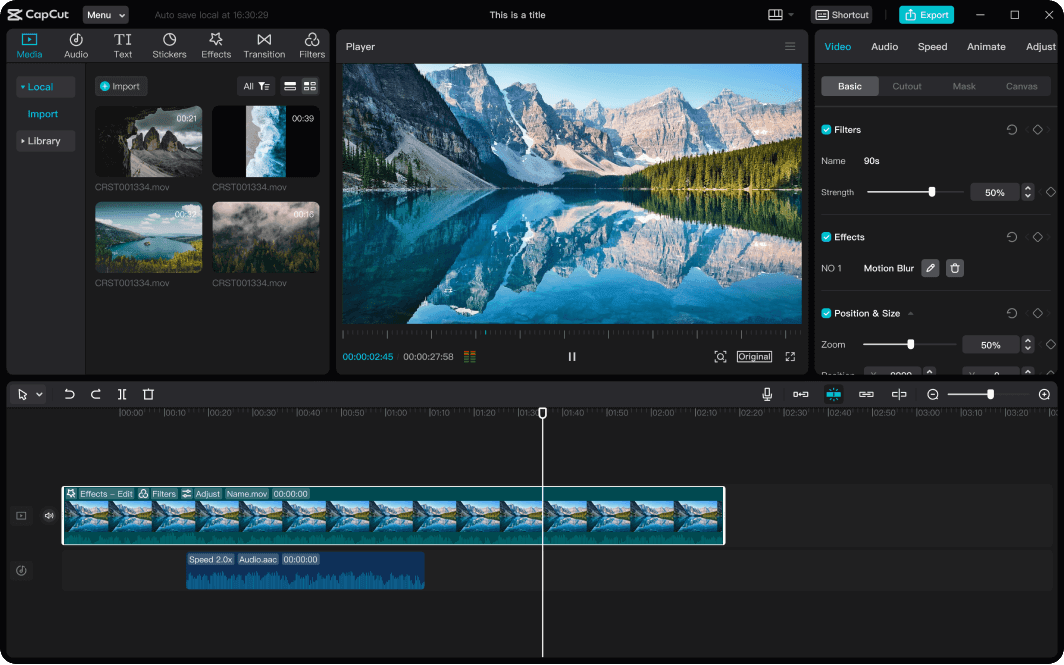

Best free editors:
-
CapCut
-
VN Editor
-
DaVinci Resolve
-
iMovie
Add:
-
Smooth transitions
-
Background music
-
On-screen text
-
B-roll footage
-
Subtitles (very important!)
YouTube favors videos with high retention — clean editing helps with that.
🟦 Step 6 — Create Viral Thumbnails (Essential for Growth)
A great thumbnail = more clicks.
Thumbnail tips:
✔ Use big bold text
✔ Show strong contrast colors
✔ Add arrows, circles, highlights
✔ Use faces (even AI-generated ones) for emotional appeal
Tools:
-
Canva
-
Figma
-
PicsArt
🟦 Step 7 — Upload Your Video With Proper SEO
Optimize your video with:
✔ Keyword-rich title
Example:
“Top 5 AI Tools You Should Use in 2025 (Free & Paid)”
✔ Description
Write 200–300 words with keywords.
✔ Tags
Add relevant keywords.
✔ Hashtags
Use 1–3 in description:
-
#youtubetips
-
#aitools
-
#motivation
SEO helps your videos rank on Google AND YouTube.
⭐ The 10-Video Rule (Critical for Beginners)
Your first 10 videos are for:
-
Testing niches
-
Testing formats
-
Testing hooks
-
Testing thumbnails
Do NOT expect perfection.
Do NOT expect instant views.
After 10 videos → analyze what worked.
⭐ How Faceless Channels Make Money (6 Income Streams)



Here’s how faceless channels earn:
💰 1. YouTube Ad Revenue
You earn once you hit:
-
1,000 subscribers
-
4,000 watch hours
(or 10M Shorts views)
💰 2. Affiliate Marketing
Perfect for faceless channels.
Examples:
-
Amazon gadgets
-
AI software
-
Online courses
-
Fitness equipment
-
Digital tools
Add your affiliate link in the description.
💰 3. Sponsorships
Brands pay $100–$10,000 per video depending on niche and views.
High-paying niches:
-
Finance
-
Tech
-
Business
-
AI
-
Productivity
💰 4. Selling Digital Products
Examples:
-
Notion templates
-
Ebooks
-
Courses
-
Presets
-
Coaching
Great passive income.
💰 5. YouTube Automation (Outsourcing Your Channel)
Hire:
-
Scriptwriters
-
Voiceover artists
-
Editors
Then scale to multiple channels.
💰 6. YouTube Shorts Bonus Program
Shorts can go viral quickly.
TikTok-style content can bring millions of views.
⭐ Faceless YouTube Upload Schedule (Grow FAST)
To reach 1K subscribers quickly, follow this schedule:
✔ Week 1: Upload 5 videos
(Testing styles)
✔ Week 2–4: Upload 3–4 videos per week
(Tweaking what works)
✔ Month 2–3: Publish 10–12 videos per month
(Focus on repeating hits)
⭐ Best Tools for Faceless YouTube Channels
🎥 Video Creation
-
Canva
-
CapCut
-
Pexels
-
AI Video Generators (Runway, InVideo AI)
🧠 Scriptwriting
-
ChatGPT
-
Jasper AI
-
Copy.ai
🎤 AI Voiceovers
-
ElevenLabs
-
Murf.ai
-
Play.ht
🎞 Stock Footage
-
Pexels
-
Pixabay
-
Storyblocks
⭐ Mistakes to Avoid (Most Beginners Make These)
❌ Overthinking your first videos
❌ Copying content word-for-word
❌ Using copyrighted footage
❌ Not optimizing titles & thumbnails
❌ Not posting consistently
❌ Choosing too broad a niche
❌ Expecting success overnight
Your first videos won’t be perfect — and that’s okay.
⭐ How Long Does It Take to Make Money?
Most faceless channels take:
-
1–2 months to hit 100 subscribers
-
3–6 months to hit 1,000 subscribers
-
6–12 months to reach consistent revenue
But with viral Shorts, growth can be MUCH faster.
⭐ Final Thoughts — Yes, You Can Make Money Without Showing Your Face
Faceless YouTube channels are one of the easiest ways to start earning online in 2025. They are low-risk, beginner-friendly, and scalable.
If you follow this guide:
✔ Pick the right niche
✔ Use AI tools to script & edit
✔ Upload consistently
✔ Focus on thumbnails & retention
✔ Monetize smartly
… you can build a profitable YouTube channel WITHOUT ever showing your face.



Pingback: How Beginners Can Make Their First $1,000 Online (Complete Guide) - Nxtainews